
Help Positions and trades
Positions and trades
A position is one trade. Fills are the executions inside it. Open Positions and Closed Positions are separate screens.
The web app comes with Basic and Pro.
Open and closed
Open Positions lists trades that are still on. Closed Positions lists trades that have been closed. Prices on open positions update while the market is open.
Options on the list
Under an option, the row shows the underlying price and a CALL or PUT badge, and whether the contract is in the money or out of the money.
Group by and filters
On Closed Positions you can group by day, week, or ticker, then sort by result or filter by strategy.
Trade details
Open a trade to see its fills. One order is one trade, and the fills are the executions of that order.
A multi-leg option spread that shares the broker's order number is grouped as one trade.
Web
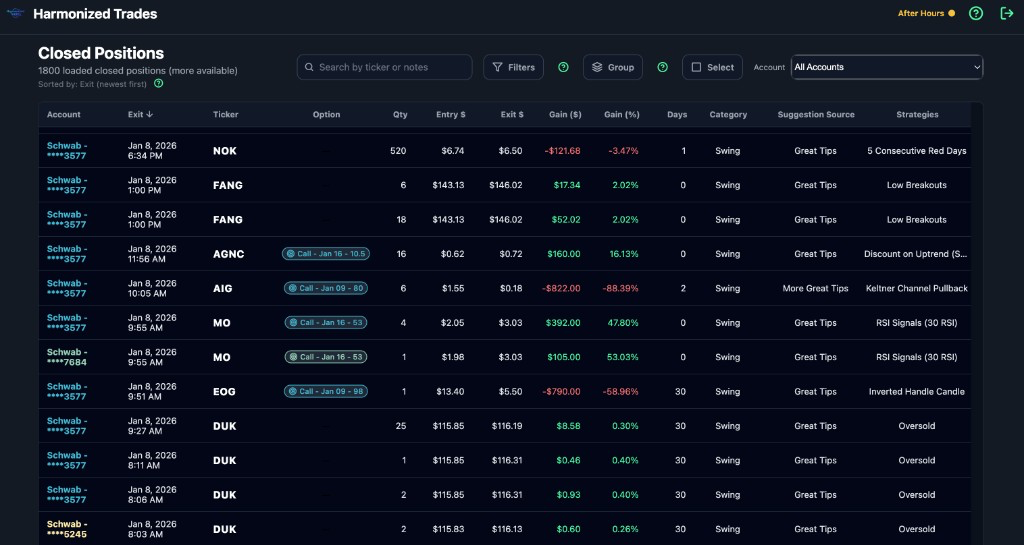
On the web app, Closed Positions is a full table: dense rows, every column, sort and filter.
Notes on a position
Each position has a notes field. That note stays on the trade. Day notes, which are about the session rather than one trade, live in the journal.
Ticker history
Ticker history lists the trades you've logged for one symbol, open and closed.
Corporate actions
Settings → Data → Corporate actions is where you review mergers and other conversions that came in from your broker, and confirm how they should land in the journal.
Still stuck? Email support